2012年11月26日 星期一

dBm - Wikipedia (3G手機, Wifi 輻射)

http://en.wikipedia.org/wiki/DBm


dBm

From Wikipedia, the free encyclopedia
A schematic showing the relationship between dBu (the voltage source) and dBm (the power dissipated as heat by the 600 Ωresistor)
dBm (sometimes dBmW) is an abbreviation for the power ratio in decibels (dB) of the measured power referenced to one milliwatt (mW). It is used in radio, microwave and fiber optic networks as a convenient measure of absolute power because of its capability to express both very large and very small values in a short form. Compare dBW, which is referenced to one watt (1000 mW).
Since it is referenced to the watt, it is an absolute unit, used when measuring absolute power. By comparison, the decibel (dB) is a dimensionless unit, used for quantifying the ratio between two values, such as signal-to-noise ratio.
In audio and telephony, dBm is typically referenced relative to a 600 ohm impedance,[1] while in radiofrequency work dBm is typically referenced relative to a 50 ohm impedance.[2]

Contents

  [hide

[edit]Unit conversions

0 dBm equals 1 milliwatt. A 3 dB increase represents roughly doubling the power, which means that 3 dBm equals roughly 2 mW. For a 3 dB decrease, the power is reduced by about one half, making −3 dBm equal to about 0.5 milliwatt.
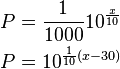
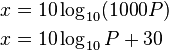
To express an arbitrary power P in watts as x in dBm, or vice versa, the following equations may be used:
\begin{align}
  x &= 10 \log_{10}(1000P)\\
  x &= 10 \log_{10}P + 30
\end{align}
and
\begin{align}
  P &= \frac{1}{1000}10^{\frac{x}{10}}\\
  P &= 10^{\frac{1}{10}(x-30)}
\end{align}
where P is the power in W and x is the power ratio in dBm. Below is a table summarizing useful cases:
dBm levelPowerNotes
80 dBm100 kWTypical transmission power of FM radio station with 50-kilometre (31 mi) range
62 dBm1.5 kW = 1,500 WMaximum legal power output of a U.S. ham radio station.[3]
60 dBm1 kW = 1,000 WTypical combined radiated RF power of microwave oven elements
50 dBm100 WTypical thermal radiation emitted by a human body
Typical maximum output RF power from a ham radio HF transceiver
40 dBm10 WTypical PLC (Power Line Carrier) transmit power
37 dBm5 WTypical maximum output RF power from a handheld ham radio VHF/UHF transceiver
36 dBm4 WTypical maximum output power for a Citizens' band radio station (27 MHz) in many countries
33 dBm2 WMaximum output from a UMTS/3G mobile phone (Power class 1 mobiles)
Maximum output from a GSM850/900 mobile phone
30 dBm1 W = 1,000 mWTypical RF leakage from a microwave oven
DCS or GSM 1,800/1,900 MHz mobile phone. EIRP IEEE 802.11a (20 MHz-wide channels) in either 5 GHz Subband 2 (5,470–5,725 MHz) provided that transmitters are also IEEE 802.11h-compliant, or U-NII-3 (5,725–5,825 MHz). The former is EU only, the latter is US only.
29 dBm794 mW
28 dBm631 mW
27 dBm500 mWTypical cellular phone transmission power
Maximum output from a UMTS/3G mobile phone (Power class 2 mobiles)
26 dBm400 mW
25 dBm316 mW
24 dBm251 mWMaximum output from a UMTS/3G mobile phone (Power class 3 mobiles)
1,880–1,900 MHz DECT (250 mW per 1,728 kHz channel). EIRP for Wireless LAN IEEE 802.11a (20 MHz-wide channels) in either the 5 GHz Subband 1 (5,180–5,320 MHz) or U-NII-2 & -W ranges (5,250–5,350 MHz & 5,470–5,725 MHz respectively). The former is EU only, the latter is US only.
23 dBm200 mWEIRP for IEEE 802.11n Wireless LAN 40 MHz-wide (5 mW/MHz) channels in 5 GHz subband 4 (5,735–5,835 MHz, US only) or 5 GHz subband 2 (5,470–5,725 MHz, EU only). Also applies to 20 MHz-wide (10 mW/MHz) IEEE 802.11a Wireless LAN in 5 GHz Subband 1 (5,180–5,320 MHz) if also IEEE 802.11h compliant (otherwise only 3 mW/MHz → 60 mW when unable to dynamically adjust transmission power, and only 1.5 mW/MHz → 30 mW when a transmitter also cannot dynamically select frequency).
22 dBm158 mW
21 dBm125 mWMaximum output from a UMTS/3G mobile phone (Power class 4 mobiles)
20 dBm100 mWEIRP for IEEE 802.11b/g Wireless LAN 20 MHz-wide channels in the 2.4 GHz ISM band (5 mW/MHz).
Bluetooth Class 1 radio. Maximum output power from unlicensed AM transmitter per U.S. Federal Communications Commission (FCC) rules 15.219.[4]
19 dBm79 mW
18 dBm63 mW
17 dBm50 mW
15 dBm32 mWTypical Wireless LAN transmission power in laptops.
10 dBm10 mW
6 dBm4.0 mW
5 dBm3.2 mW
4 dBm2.5 mWBluetooth Class 2 radio, 10 m range
3 dBm2.0 mWMore precisely (to 8 decimal places) 1.9952623 mW
2 dBm1.6 mW
1 dBm1.3 mW
0 dBm1.0 mW = 1,000 µWBluetooth standard (Class 3) radio, 1 m range
−1 dBm794 µW
−3 dBm501 µW
−5 dBm316 µW
−10 dBm100 µWTypical maximum received signal power (−10 to −30 dBm) of wireless network
−20 dBm10 µW
−30 dBm1.0 µW = 1,000 nW
−40 dBm100 nW
−50 dBm10 nW
−60 dBm1.0 nW = 1,000 pWThe Earth receives one nanowatt per square metre from a magnitude +3.5 star[5]
−70 dBm100 pW
−73 dBm50.12 pW"S9" signal strength, a strong signal, on the S-meter of a typical ham or shortwave radio receiver
−80 dBm10 pWTypical range (−70 to −90 dBm) of wireless received signal power over a network (802.11 variants)
−100 dBm0.1 pW
−111 dBm0.008 pW = 8 fWThermal noise floor for commercial GPS single channel signal bandwidth (2 MHz)
−127.5 dBm0.178 fW = 178 aWTypical received signal power from a GPS satellite
−174 dBm0.004 aW = 4 zWThermal noise floor for 1 Hz bandwidth at room temperature (20 °C)
−192.5 dBm0.056 zW= 56 yWThermal noise floor for 1 Hz bandwidth in outer space (4 kelvins)
−∞ dBm0 WZero power is not well-expressed in dBm (value is negative infinity)
The signal intensity (power per unit area) can be converted to received signal power by multiplying by the square of the wavelength and dividing by 4π (see Free-space path loss).
In United States Department of Defense practice, unweighted measurement is normally understood, applicable to a certain bandwidth, which must be stated or implied.
In European practice, psophometric weighting may be, as indicated by context, equivalent to dBm0p, which is preferred.
In audio, 0 dBm often corresponds to approximately 0.775 Volts, since 0.775 Volts dissipates 1 mW in a 600 Ω load.[6] dBu measures against this reference voltage without the 600 Ω restriction.
The dBm is not a part of the International System of Units and therefore is discouraged from use in documents or systems that adhere to SI units (the corresponding SI unit is the watt). However the straight decibel (dB), being a unitless ratio of two numbers, is perfectly acceptable.[7]
Expression in dBm is typically used for optical and electrical power measurements, not for other types of power (such as thermal). A listing by power levels in watts is available that includes a variety of examples not necessarily related to electrical or optical power.
The dBm was first proposed as an industry standard[6] in the paper "A New Standard Volume Indicator and Reference Level".[8]

[edit]See also

[edit]References

 This article incorporates public domain material from the General Services Administration document "Federal Standard 1037C" (in support of MIL-STD-188).
  1. ^ Bigelow, Stephen. Understanding Telephone Electronics. Newnes. pp. 16. ISBN 978-0750671750.
  2. ^ Carr, Joseph (2002). RF Components and Circuits. Newnes. pp. 45-46. ISBN 978-0750648448.
  3. ^ "Part 97 - Amateur Radio". ARRL. Retrieved 9/21/2012.
  4. ^ http://www.hallikainen.org/FCC/FccRules/CiteFind/015219.htm
  5. ^ Radiant Flux of a Magnitude +3.5 Star
  6. a b Davis, Gary (1988). The Sound Reinforcement Handbook. Yamaha. pp. 22. ISBN 0881889008.
  7. ^ Taylor 1995, Guide for the Use of the International System of Units (SI), NIST Special Publication SP811
  8. ^ Chinn, H.A.; D.K. Gannett, R.M.Moris (January 1940). "A New Standard Volume Indicator and Reference Level"Proceedings of the Institute of Radio Engineers 28 (1): 1-17. doi:10.1109/JRPROC.1940.228815.

[edit]External links


This page was last modified on 23 September 2012 at 04:56.


========================================================================


USB On-The-Go - 維基百科,自由的百科全書 (knowledge - computer - hardware)

http://zh.wikipedia.org/zh-hk/USB_On-The-Go


USB On-The-Go

維基百科,自由的百科全書
USB OTG 標誌
USB On-The-Go通常縮寫為USB OTG,是USB2.0規格的補充標準。它支持讓USB設備,例如數字音頻播放器或手機作為主機,允許USB閃存驅動器、鼠標或鍵盤與其連接。

目錄

  [隱藏

[編輯]架構

標準的USB使用主從master/slave)的架構,USB主機端(即電腦)是「主」,而USB周邊裝置Peripheral)是「從」。只有USB伺服器可以排程該連結的設定與資料傳輸。USB周邊裝置不能夠啟動資料傳輸,只能回應伺服器的指令。
USB OTG改變了這種狀況。配件不再需要一定要成為單純的周邊裝置,它們有時候也可以成為主機端。舉例來說,USB鍵盤打印機可以與手持的無線元件結合。或是打印機會自動從特定周邊裝置中找出要打印的文件來打印。有相容USB OTG標準的元件能夠啟動並控制連結,也可以自行切換主機端與周邊裝置的角色。 不過目前支持的廠商比較少,主要是數碼伴侶支持此功能,移動電話在中國大陸只有少數幾款高端使用Windows Mobile系統的支持此功能。現在不少播放器開始支持此功能,但大多數在主端時只支持讀取功能。

[編輯]規格

[編輯]協議

[編輯]設備角色

[編輯]目標外設列表

[編輯]接口

[編輯]OTG迷你接口

[編輯]OTG微型接口

[編輯]OTG微電纜

[編輯]向下兼容性

[編輯]充電器的兼容性

主條目:USB
有些設備可以通過USB端口為其電池充電;有些甚至可以檢測到專用充電器,並汲取大於500mA的電流量,以幫助其更快速的充電。OTG設備也不例外。[1]

[編輯]參見

[編輯]參考資料

  1. ^ Battery Charging Specification. USB Implementers Forum, Inc. 15 April 2009 [23 September 2009].

[編輯]外部連結


========================================================================


2012年11月21日 星期三

Bits, Bytes and Bandwidth Reference Guide - Abbreviations Table (knowledge - 電腦)

http://www.speedguide.net/articles/bits-bytes-and-bandwidth-reference-guide-115

SpeedGuide_net: Bits, Bytes and Bandwidth Reference Guide

Bits, Bytes and Bandwidth Reference Guide

2001.01.01 01:53 by Philip
Keywords: bit, byte, conversion


Quick Conversions...

For a quick reference, ue our Bits/Bytes Conversion Calculator.

For the few people that care to learn it right (or be confused to death), read on ;)

The Bits vs. Bytes Confusion

Let's start with some background information on prefixes, by mentioning the Metric system:
  • kilo (k)* = 10 ^ 3 = 1,000 thousand
  • mega (M) = 10 ^ 6 = 1,000,000 million
  • giga (G) = 10 ^ 9 = 1,000,000,000 billion
  • tera (T) = 10 ^ 12 = 1,000,000,000,000 trillion
* Note that according to the Metric system, the "k" or "kilo" prefix is always lowercase.
The binary forms of kilobytes and megabytes have become standard throughout the computer industry, although they are incorrect uses of the SI prefixes (in the IT field lowercase "k" is used to describe decimal kilobits, and capital "K" is used for binary kilobytes).


When used to describe Data Transfer Rate, bits/bytes are calculated as in the metric system

In data communications, a kilobit is a thousand bits, or 1,000 bits. It's commonly used for measuring the amount of data that is transferred in a second between two telecommunication points. Kilobits per second is usually shortened to kbps or Kbps**. Some sources define a kilobit to mean 1,024 bits. Although the bit is a unit of the binary number system, bits in data communications are discrete signal pulses and have historically been counted using the decimal number system. For example, 28.8 kilobits per second (kbps) is 28,800 bits per second.
  • 1 bit (b) = 0 or 1 = one binary digit
  • 1 kilobit ( kb) = 10^3 bits = 1,000 bits
  • 1 Megabit (Mb) = 10^6 bits = 1,000,000 bits
  • 1 Gigabit (Gb) = 10^9 bits = 1,000,000,000 bits
** Note:  Although technically speaking, the term kilobit should have a lowercase initial letter, most published reports capitalize it in abbreviation, resulting in "56 Kbps," or even the really confusing "56K."  That leaves you with the sometimes omitted lowercase "b" to distinguish between bits (b) and bytes (B). When used as a measurement of network data transfers, or throughput, always assume the word is bits first.

When used to describe Memory Size, or Data Storage bits/bytes are generally calculated as some exponent of 2

In Data storage, and when describing Memory size, a Kilobyte is 2^10, or 1024 bytes. Because of binary computer architecture and memory address boundaries, bytes are always some multiple or exponent of two.
  • 1 byte (B) = 8 bits (b)
  • 1 Kilobyte (K / KB) = 2^10 bytes = 1,024 bytes
  • 1 Megabyte (M / MB) = 2^20 bytes = 1,048,576 bytes
  • 1 Gigabyte (G / GB) = 2^30 bytes = 1,073,741,824 bytes
  • 1 Terabyte (T / TB) = 2^40 bytes = 1,099,511,627,776 bytes

Although data storage capacity, such as on hard drives is generally expressed in binary Megabytes (2^20), most Hard disk manufacturers, and some newer BIOSes use decimal megabytes (10^6), which is slightly different and it gets confusing...
  • 1 byte (B) = 8 bits (b)
  • 1 Kilobyte (K / KB) = 10^3 bytes = 1,000 bytes
  • 1 Megabyte (M / MB) = 10^6 bytes = 1,000,000 bytes
  • 1 Gigabyte (G / GB) = 10^9 bytes = 1,000,000,000 bytes
  • 1 Terabyte (T / TB) = 10^12 bytes = 1,000,000,000,000 bytes

Abbreviations Table
 
bit b 0 or 1
byte B 8 bits
kilobit kb 1000 bits
kilobyte (binary) KB 1024 bytes
kilobyte (decimal) KB 1000 bytes
Megabit Mb 1000 kilobits
Megabyte (binary) MB 1024 Kilobytes
Megabyte (decimal) MB 1000 Kilobytes
Gigabit Gb 1000 Megabits
Gigabyte (binary) GB 1024 Megabytes
Gigabyte (decimal) GB 1000 Megabytes


Bandwidth Reference Table

DS0 (digital signal 0) is digital transmission rate of 64 Kbps, the bandwidth normally used for one telephone voice channel. It is the base multiple for both T (North America) and E (Europe) DS (digital signal) carriers.

The following table summarizes the set of signals and their relationship to the T-carrier and E-carrier systems


SG Bandwidth Reference Table
 DSx / Ex / Jx  Data rate  DS0 multiple Carrier
DS0(E0/J0) 64 kbps 1
128 kbps 2 ISDN
DS1 1.544 Mbps 23 (24) T1
E1 2.048 Mbps 30 (32) E1
DS1C / J1C 3.152 Mbps 46 (48) T1C / J1C
DS2 / J2 6.312 Mbps 92 (96) T2 / J2
E2 8.448 Mbps 120 (132) E2
J3 32.064 Mbps 480 J3
E3 34.368 Mbps 480 (537) E3
DS3 44.736 Mbps 644 (672) T3
STS1 51.84 Mbps 672 OC1
DS3C 89.472 Mbps 1288 (1344) T3C
J4 97.728 Mbps 1440 J3C
DS3X 134.208 Mbps 1932 (2016) T3X
E4 139.264 Mbps 1920 (2148) E4
STS-3 / SDH-1 155.52 Mbps 2016 OC3
DS4 274.176 Mbps 3864 (4032) T4
J5 400.352 Mbps 5760 J4
DS4E 411.264 Mbps 5796 (6048) T4E
STS-9 / SDH-3 466.56 Mbps 6048 OC9
DS4C 560.160 Mbps 7728 (8064) T4C
E5 565.148 Mbps 7680 (8592) E5 (4 E4 chnnels)
STS-12 / SDH-4 622.08 Mbps 8064 OC12
DS4X 822.528 Mbps 11592 (12096) T4X
STS-18 / SDH-6 933.12 Mbps 12096 OC18
DS5 1.120 Gbps 15456 (16128) T5
STS-24 / SDH-8 1.244 Gbps 16128 OC24
DS5X 1.400 Gbps 19320 (20160) T5X
DS5E 1.680 Gbps 23184 (24192) T5E
STS-36 / SDH-12 1.866 Gbps 24192 OC36
STS-48 / SDH-16 2.488 Gbps 32256 OC48
STS-96 / SDH-32 4.976 Gbps 64512 OC96
STS-192 / SDH-64 9.952 Gbps 129024 OC192
STS-256 13.271 Gbps 172032 OC256
STS-768 / SDH-256 39.813 Gbps 516096 OC768


Note: The following digital signal levels are not standardized and/or are not in common use:
DS3C, DS3X, DS4E, DS4C, DS4X, DS5, DS5X, DS5E, E5, J5, STS-9, STS-18, STS-24, STS-36, STS-256, STS-768.


========================================================================


2012年11月8日 星期四

2012-11-02 LG電視「死因」﹕節目表太長 (iDTV / 機頂盒)

http://news.sina.com.hk/news/20121102/-2-2813273/1.html


LG電視「死因」﹕ 節目表太長

明報 2012-11-02 05:00


張先生翌日以手機致電LG熱線達200次(圖為致電紀錄)才能接通,對方卻未能提供協助,令他氣憤。(雲錦鋒攝)

張先生翌日以手機致電LG熱線達200次(圖為致電紀錄)才能接通,對方卻未能提供協助,令他氣憤。(雲錦鋒攝)


張先生投訴花2萬元買的55吋LG電視,前晚起故障,不斷自動開關。通訊辦昨證實故障源於部分型號的LG電視未能處理電視台一些檔案較長的新電視節目表(EPG)所致,為解決問題,電視台昨已縮短EPG長度,LG亦已推出新韌體。(雲錦鋒攝)

張先生投訴花2萬元買的55吋LG電視,前晚起故障,不斷自動開關。通訊辦昨證實故障源於部分型號的LG電視未能處理電視台一些檔案較長的新電視節目表(EPG)所致,為解決問題,電視台昨已縮短EPG長度,LG亦已推出新韌體。(雲錦鋒攝)


不斷自動開機關機 需改韌體

【明報專訊】本港大批LG iDTV周二晚起突然不斷自動關機及開機,不少網民猛批LG不負責任及無公開解釋故障,受影響用戶或數以千計,通訊辦亦收到至少21宗投訴。通訊辦聯絡LG及電視台後,確認故障起因是電視台前晚更新的電子節目表(EPG)檔案較長,部分LG電視韌體無法處理所致。兩大電視台昨即時用回體積較小的EPG檔案,暫時解決故障。

電視台暫用回短表應變

為徹底解決問題,LG韓國總公司已派工程師來港協助,昨並研究出新韌體解決故障。LG稱用戶可致電3543 7777預約人員上門為客戶更新電視韌體,或親身前往旺角辦事處領取含新韌體的USB記憶手指(見表)。電視台則承諾在LG完成韌體更新前,不會傳送過大的EPG檔案,免同樣問題再發生。

投訴人:熱線打200次方通

本報收到市民張先生投訴,指7月初以2萬元購買了一部55吋LM 8600立體智能電視,但至周二(30日)晚上他轉到高清頻道時,電視開始不停自動關機及開機,令他無法收看高清頻道。張先生翌日致電LG客戶熱線查詢,打了逾200次電話才接通,對方告知這是部分型號的技術問題,惟目前未有解決方法。張先生等了一天仍未有消息,再致電時對方竟叫他自資購置新機頂盒,令他憤怒。

大批LG用戶經歷與張先生相似,在網上討論區留言斥責LG,促盡快解決問題。張先生稱昨上午11時電視終恢復正常,但怒斥LG不負責任,一直無主動告知客戶,亦無在網站通報,有用戶則在LG的facebook網站留言,投訴LG客戶熱線長期不通,有人打了逾500次才接通。
通訊事務管理局辦公室表示,過去兩日共接獲21宗投訴,涉及LG某些型號的iDTV電視機,在本月30日晚上開始出現重複關機及開機問題,通訊辦、LG及電視台的調查顯示,故障原因是電視台周二晚更新的「電子節目表」(EPG)檔案較長,相關型號的LG iDTV韌體未能處理所致。無綫發言人表示,過去兩日收到5宗投訴。


========================================================================

http://hk.news.yahoo.com/lg%E9%9B%BB%E8%A6%96-%E7%86%84%E6%A9%9F-%E5%8D%87%E7%B4%9A%E8%BB%9F%E4%BB%B6%E5%8C%96%E8%A7%A3-223000096.html

LG電視「熄機」升級軟件化解

星島日報 – 2012年11月2日 星期五 上午6:30


(綜合報道)(星島日報報道)韓國LG LM系列電視,受兩家免費電視台系統更新影響,導致集體「熄機」,LG經韓國總部技術專家來港研究後,證實是相關電視軟件與電視台發送資訊進行解碼時起衝突,公司已備妥軟件供用家更新升級化解「災難」。
  無綫與亞視本周日起更新視訊編碼技術,由標清格式轉換至高清廣播,但全綫新出LG LM系列智能電視竟於兩日後爆出集體故障,離奇反覆自動開關,約有二萬用家大受影響,買了高清技術電視,卻被逼降級轉收看標清節目,紛紛在網上表示有關公司應回收及賠償。
  用家促回收賠償
  LG發言人解釋,由於電視台傳送節目資訊進行解碼期間,與LG LM系列電視的短暫軟件出現衝突,為了優化電視功能及解決狀況,公司已推出LG Smart TV 軟件 (firmware) ,全綫LG電視系列的內置系統將於下周二(六日)起自動更新。
  發言人強調,今次事件並非電視硬件故障,只要進行軟件升級,便不會再有問題,故不會停售或回收該系列電視。
  如個別用家欲提早為電視系統升級,今日起可到LG客戶服務中心,免費領取備更新軟件的USB記憶體,回家自行安裝;或即日致電LG客戶熱綫三五四三 七七七七,預約安排技術人員上門更新軟件。本報記者


========================================================================


2012年11月1日 星期四

2012-11-01 LG新系列電視集體熄機 (iDTV / 機頂盒)

http://news.sina.com.hk/news/20121101/-2-2812498/1.html

LG新系列電視集體熄機 - 星島日報


11 - 01 00:03

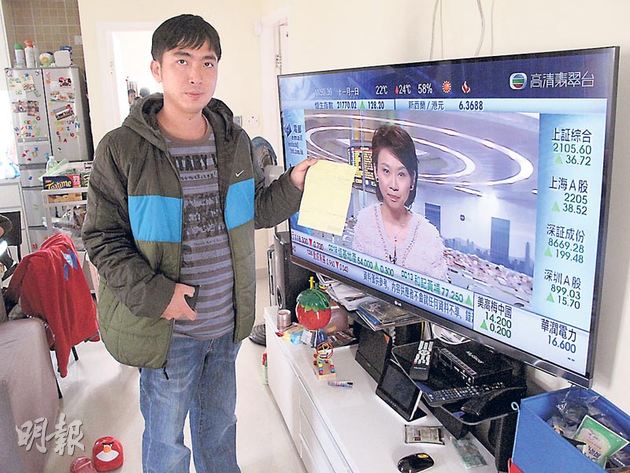
連鎖電器店仍有出售受影響的LG LM系列電視。
(綜合報道)(星島日報報道)穩坐全球第二大電視製造商韓國品牌LG,在萬聖節遇上黑色災難日。其新推出具上網及3D技術的LM系列智能電視,疑受無綫及亞視近日更新視訊編碼技術影響,發生罕見集體「熄機」事件,每隔十秒反覆自動開關,逾二萬用戶昨狂致電廠方求救,塞爆熱綫,恐未來一星期無法追劇。LG表示,韓國總公司已派專家來港研究對策。

本港電視台更新視訊編碼技術,疑與新款智能電視技術未能配合,爆出電視集體故障事件。據知,受影響的LG Cinema 3D Smart TV(LM型號)系列,約半年前推出,配備三十二、四十二、四十七及五十五吋,主打家庭私人影院,具優質畫面及無綫上網技術,售價由二萬元至三萬多元不等,在港深受歡迎。

無綫及亞視本周日凌晨開始更新視訊編碼技術,部分頻道由標清格式轉換至高清廣播,不少用戶電視機因此出現接收問題,要啟用電視搜索功能重新搜台。至前日深夜十一時開始,一眾LG LM系列用家先後發現啟動中的電視突自動關機,十秒後又自動恢復開機及亮出LG標誌畫面,但每隔十秒又重複自動開關,用戶根本無法收看節目。

據了解,該系列電視雖面世不久,在港已售出二萬多部,很多用戶只買了一、兩個月,甚至剛新買,沒想到出現此情況,昨紛紛致電向廠方求救,一時間塞爆LG客戶熱綫,部分人狂打六小時才能接通,也有多人在網上狂轟有關公司,又為無法追劇感無癮。

據悉,有職員向用戶承認因電視台更新技術與電視系統出現衝突,暫只能為客戶登記資料,稍後安排技術員上門跟進,但因人數眾多,不排除要輪候一星期才有人員登門維修。

LG發言人表示,對事件深表關注,並在收到顧客產品查詢後即成立專案小組,韓國總公司亦即派遣技術人員來香港,與相關電視台商討情況,務求在最短時間提供解決方案,將影響減至最低。如市民有任何查詢,可致電三五四三 七七七七。

無綫外事部副總監曾醒明表示,公司昨收到三十多個查詢報告,均為LG電視用家,無涉其他品牌。他透露,受影響的電視具上網等較複雜的技術功能,可能因此出現更新時的技術問題,雙方已派工程部人員接觸,希望盡快研究出解決方法。亞視發言人亦稱知悉有關問題,LG將派技術專家研究對策,但公司暫未能提供投訴數字。


========================================================================

http://hk.apple.nextmedia.com/news/art/20121101/18054324


LG電視轉高清台即死機 

2012-11-01 

蘋果日報  


Initial Image


【本報訊】兩間免費電視台日前提升視訊編碼,大批韓國LG LM系列的智能電視機接連出現「死機」情況,不斷自動開關,無法接收高清節目。通訊事務管理局昨收到14宗相關投訴。有專家估計,有關機種未能自行解碼,兼容H.264新視頻編碼。LG已調派韓國技術人員來港跟進。

LM系列多個型號出事

綜合市民投訴,有關的LG LM系列智能電視機型號包括6200、6400、6700及7600。市民陳先生表示,前晚原本收看高清節目,但轉台後就再看不到,每隔10秒自動關閉,再自行啟動,最後只能收看非高清節目。他今年7月以6,000多元購買LG32LM6200智能電視,「冇諗過咁快出事,由高清變低清」。

市民尹先生也稱,兩個月前購買的LG42LM7600智能電視,前晚不斷重複開關,要切斷電源才能停止。昨早他致電LG維修部查詢,職員指有近千名客戶遭遇同一問題,但至今未有任何跟進,「好似未做好QC(品質監控)就推出市場,好似被人欺騙」,促LG回收及賠償。

兩間免費電視台本月28日凌晨起,把四個廣播頻道的視頻編碼由MPEG-2轉為H.264,以提升畫質及數碼廣播格式,但連日來不少市民批評接收訊號欠佳,畫面「起格」。無綫電視外務副總監曾醒明表示,若出現接收問題,只需重新搜索頻道便可,惟昨收到不少查詢均牽涉LG智能電視,曾與LG工程部了解,初步相信與訊號接收無關,「其他牌子都睇到」。

香港專業教育學院資訊及通訊科技系系主任梁秉雄指出,視頻編碼由MPEG-2轉為H.264,一般數碼電視應可自行解碼,估計有關LG電視型號,其解碼軟件無法完全將H.264的訊號解碼,且包容度嚴謹,當出現錯誤時便會中止解碼,強行關閉再重新嘗試解碼,故出現自動開關情況。

通訊局昨收到14宗相關投訴。發言人指,兩家電視台昨與LG進行聯合測試,至今未能確定原因,會跟進情況。LG電子對事件表示關注,已成立專案小組,韓國總公司也派遣技術人員來港跟進。市民有任何查詢可致電35437777。


========================================================================